How to Wipe Phone Before Selling: The Ultimate 2026 Data Security Checklist

Table of Contents
- Key Takeaways
- Table of Contents
- Why Data Security is Non-Negotiable Before Selling Your Device
- The iOS Wiping Protocol: Preparing Your iPhone for a New Owner
- The Android Data Erasure Guide: Cleaning Samsung and Google Devices
- The Physical and Hidden Data Checklist: Beyond the Digital Reset
- Next Steps: Turning Your Clean Device into Cash in Cincinnati
- Secure Your Digital Identity and Your Payout
- Frequently Asked Questions
Did you know that consumers received $1.63 billion from mobile trade-in programs in the first quarter of 2026 alone? This is a 31% increase from the same period in 2025, which proves your old device is a valuable financial asset. However, securing a top-dollar payout requires more than just a clean screen. You need to know exactly how to wipe phone before selling to prevent identity theft and ensure the buyer isn't locked out of the hardware. If you don't follow the correct protocol, you could leave your private data exposed or accidentally render the phone useless for the next owner.
It's normal to feel anxious about whether your photos are truly deleted or if your banking apps remain accessible. You might also feel confused about the specific steps required for the latest software versions. This guide provides a professional checklist to move your data safely and erase your hardware permanently. We'll walk you through the necessary steps for iOS 26.6 and Android 17, covering all aspects of data privacy and security. By following these instructions, your phone will be a clean slate ready for a safe, high-value sale.
Key Takeaways
- Master the distinction between a simple factory reset and a professional data wipe that destroys encryption keys to prevent identity theft.
- Follow a step-by-step technical guide on how to wipe phone before selling to ensure all iCloud, Google, and manufacturer-specific activation locks are fully disabled.
- Perform a final physical and digital audit to remove SIM cards and erase eSIM profiles that often retain personal identifiers after a standard reset.
- Prepare your device for an immediate cash payout by verifying its diagnostic state before visiting a local buyback center in Cincinnati or Fairfield.
Why Data Security is Non-Negotiable Before Selling Your Device
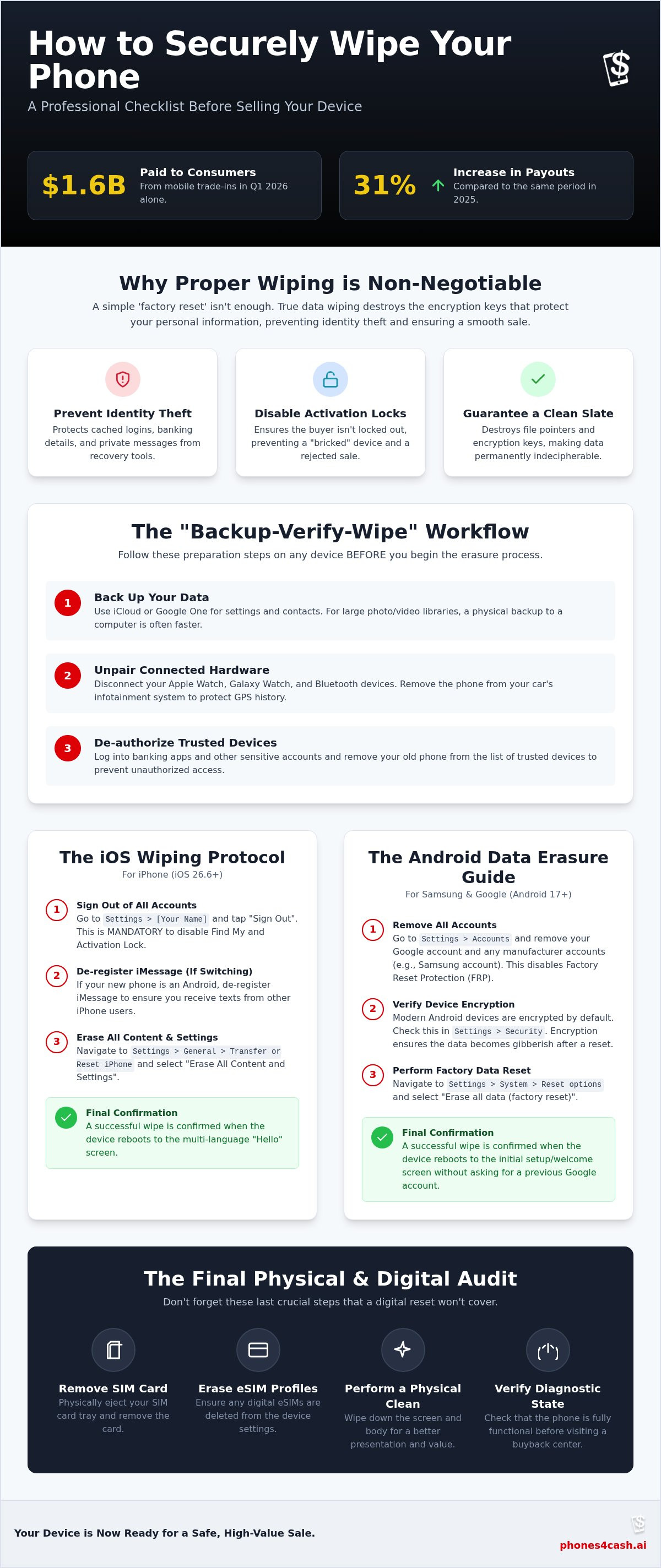
Selling your device without a proper data purge is a significant security risk. True data wiping is the permanent removal of the encryption key that protects your files. Without this key, the data remains on the storage chip but becomes indecipherable gibberish. If you simply perform a standard factory reset without ensuring the encryption cycle is complete, sophisticated recovery tools might still retrieve fragments of your life. Understanding how to wipe phone before selling is the only way to ensure your banking details and private messages don't end up in the wrong hands.
Identity theft often stems from cached login credentials rather than just saved files. Many apps stay logged in via tokens that bypass the need for a password. If these tokens aren't cleared, a new owner could potentially access your social media or email accounts. Simply deleting your photos is insufficient because file pointers are removed while the actual data persists until overwritten. Additionally, failing to remove activation locks can render the device worthless to a buyer, as they'll be locked out of the setup screen. This creates a poor experience for the buyer and may lead to a rejected sale.
The Preparation Phase: Backing Up Your Life
Before you initiate any erasure, you must secure your data. Cloud backups like iCloud or Google One are convenient for settings and contacts, but physical backups to a computer are often faster for large video libraries. Always verify that your two-factor authentication (2FA) is tied to your new phone number or a secondary email before you lose access to the old device. The "Backup-Verify-Wipe" workflow is the industry gold standard for a successful transition.
Unpairing Connected Hardware
Your phone acts as a hub for various peripherals that must be disconnected individually. If you own an Apple Watch or Galaxy Watch, unpair it through the dedicated wearable app to ensure the activation lock on the watch is also released. You should also clear your phone from your car's infotainment system to protect your GPS history and contact list. Learning how to wipe phone before selling includes these peripheral steps to ensure a total digital disconnect. Finally, log into your banking app and remove the current device from your Trusted Devices list to prevent unauthorized access attempts from the hardware you no longer own.
The iOS Wiping Protocol: Preparing Your iPhone for a New Owner
For Apple users, the process is highly structured to protect against theft. You must follow the manufacturer's sequence to ensure the device is legally and technically ready for transfer. According to the Federal Trade Commission, taking the time to remove your personal information is the only way to prevent unauthorized access to your cloud-stored data. Learning how to wipe phone before selling an iPhone involves more than a simple reset; it requires decoupling the hardware from your digital identity across all Apple services.
First, sign out of iCloud, iTunes, and the App Store to break the link between the device and your media libraries. If you are moving to an Android device, you must also de-register iMessage. If you forget this step, incoming texts from other iPhone users may continue to route to your old iMessage account instead of your new phone. Once these steps are complete, navigate to Settings, General, and then Transfer or Reset iPhone. Select "Erase All Content and Settings" to trigger the hardware encryption wipe.
Removing Activation Locks and Apple Accounts
To start the logout process, open Settings, tap your name at the top, and scroll down to "Sign Out." You will be prompted for your Apple Account password. This step is mandatory because it disables "Find My" and the Activation Lock. These features are designed to prevent theft, but they also prevent a legitimate buyer from setting up the device. If you skip this, the phone becomes "bricked" for the next owner. If you can't remember your password, use Apple's recovery portal to reset it before you attempt to erase the hardware.
Finalizing the iOS Reset
After the erasure is complete, the device will reboot. You must see the "Hello" screen in multiple languages to confirm a successful reset. If the phone asks for a passcode or an Apple Account during the initial setup, the wipe was incomplete. Don't forget to check for active AppleCare+ plans. These often need to be manually cancelled or transferred to your new device to avoid unnecessary charges. Once you've verified the "Hello" screen, you are ready to sell your used iPhone in Cincinnati for the best market value. If you are unsure about the status of your device, you can always visit a local professional for expert diagnostic services to confirm your data is gone.
The Android Data Erasure Guide: Cleaning Samsung and Google Devices
Android's open ecosystem offers flexibility, but it also creates specific hurdles for data security. Unlike iOS, where the process is centralized, Android users must navigate both Google and manufacturer-specific accounts to ensure a clean break. Learning how to wipe phone before selling an Android device requires a specific sequence to avoid the common pitfall of Factory Reset Protection. If you don't follow this order, you might leave the device in a state where the buyer cannot activate it without your personal password.
Start by removing all Google Accounts. Navigate to Settings, then Passwords & Accounts (or Users & Accounts on some models). Select each account and tap "Remove account." Next, sign out of manufacturer accounts like Samsung or Xiaomi. These often have their own "Find My Device" equivalents that must be disabled. Finally, remove your screen locks. Go to Security and set your PIN, pattern, or biometrics to "None." Once the accounts and locks are gone, you can proceed to System, Reset options, and select "Erase all data (factory reset)."
Understanding Factory Reset Protection (FRP)
FRP is a security feature designed to make a stolen phone useless. It requires the original owner's Gmail credentials to set up the device after a reset. However, if you reset the phone without removing the account first, the buyer will be stuck at the setup screen. This is the primary reason for rejected trade-ins and delayed sales. To prevent this, always delete the Google Account from the settings menu before you trigger the hardware reset. For Samsung users, you must also deactivate "Find My Mobile" within the Samsung Account settings to fully release the hardware.
Manual Encryption for Older Android Models
Device security has evolved significantly over the last decade. If your device runs Android 6.0 or newer, your data is encrypted by default. For older models, you should manually encrypt the device before wiping it. Navigate to Settings, Security, and select "Encrypt phone." This process ensures that even if data remnants persist on the storage chip, they remain unrecoverable gibberish without the original key. Don't forget the physical storage. Always eject the MicroSD card if your phone has an expansion slot. These cards often contain years of photos and are frequently left behind during a sale. Understanding how to wipe phone before selling ensures you get an immediate cash payout when you visit a professional buyback location in Cincinnati.
The Physical and Hidden Data Checklist: Beyond the Digital Reset
Digital erasure is the core of the security process, but physical components often harbor personal identifiers that a software reset cannot touch. You must perform the "Paperclip Test" by ejecting the SIM tray before handing over your device. Physical SIM cards often store contact lists and text messages that remain on the chip even after the phone is wiped. If you leave this card inside, the next owner could potentially access your phone number or cellular service. Gathering your original box, wall adapter, and cables is also beneficial. Including these items increases the resale value by providing a complete set for the next user. Understanding how to wipe phone before selling involves both these physical and digital precautions.
ESIM and Virtual SIM Management
Modern devices increasingly rely on virtual SIMs. Many users assume a factory reset clears everything, but eSIM profiles can persist through a standard wipe if you aren't careful. When you initiate the final erasure, the operating system will usually prompt you to choose whether to keep or remove your cellular plans. Always select the option to erase cellular plans during the final reset to prevent the buyer from accessing your data plan. Mastering how to wipe phone before selling in 2026 requires specific attention to these virtual credentials. You should also contact your carrier, such as T-Mobile, Verizon, or AT&T, to confirm the line has been successfully transferred to your new device.
Physical Cleaning and Final Inspection
A clean phone suggests a well-maintained device. This often leads to a higher payout during the appraisal process. Use 70% isopropyl alcohol wipes to sanitize the exterior, but avoid getting moisture directly into the ports. Use a soft, dry brush to clear dust from the speakers and the charging port. This is also the time to perform a final damage assessment. Distinguishing between a deep scratch and a functional crack is vital for accurate grading because it impacts the technical diagnostic report. If your screen has seen better days, read our guide on selling a cracked iPhone in Cincinnati to understand how it affects your cash offer. Once your device is physically and digitally sanitized, you can get an instant buyback quote from our local experts for the fastest transaction.
Next Steps: Turning Your Clean Device into Cash in Cincinnati
Once you've executed the technical steps on how to wipe phone before selling, the final phase is converting that hardware into capital. A fully prepared device with all activation locks disabled is a liquid asset. While online marketplaces are a common choice, they introduce variables like shipping damage, platform fees, and the risk of return fraud. Choosing a local professional ensures that your data security efforts are verified by an expert and rewarded with immediate payment. This is the most efficient way to close the loop on your old technology and ensure your private information stays protected.
Why Local Buyback Wins in 2026
Online selling platforms in 2026 are increasingly plagued by "return fraud" and "shipping scams." A buyer might claim a device is defective to force a partial refund or even swap internal components before returning the unit. By visiting a local buyback center in Cincinnati, you eliminate these risks entirely. You receive a professional diagnostic check on the spot, which confirms the functional state of your iPhone or Samsung device. This face-to-face transaction provides total transparency and supports the local economy. It also ensures that the person handling your device is a disciplined professional who understands the value of a properly sanitized phone. You don't have to worry about a package getting lost in the mail or a buyer disputing a transaction weeks after the sale.
The Phones4cash Advantage
Phones4cash LLC operates our Cincinnati store, which serves Fairfield and the Mason–West Chester area. We focus on a streamlined, transparent process that prioritizes your time and security. While we are experts in smartphones, our buyback program extends to other electronics. We buy computers, smartwatches, game consoles, and tablets. If you followed the steps on how to wipe phone before selling, our technicians can verify the device state in minutes. We value refurbished inventory and provide a competitive outlet for devices that are ready for a second life.
For your appointment, please bring the wiped device, any original accessories you still have, and a valid government-issued ID. Bringing the original box or charging cables can often increase your final quote. We provide immediate cash payouts for properly prepared devices, which is a significant advantage over waiting weeks for an online payment to clear. This cash-on-the-spot model is ideal for those looking to offset the cost of a new upgrade immediately. Visit Phones4cash in Cincinnati for an instant quote today!
Secure Your Digital Identity and Your Payout
Securing your digital identity is a multi-step process that extends beyond a simple reset. By destroying encryption keys and removing activation locks, you protect your personal information while ensuring the hardware is ready for its next owner. Understanding how to wipe phone before selling is the difference between a successful transaction and a significant security risk. It's vital to check for physical SIM cards and persistent eSIM profiles to complete your professional checklist.
Once your device is sanitized, you can confidently transition your old hardware into immediate capital. Our local Cincinnati experts provide professional data security verification to give you total peace of mind. We offer instant cash for both used and broken devices at our Cincinnati store, serving Fairfield and Mason. Ready to sell? Get an instant cash quote from Phones4cash in Cincinnati! Your data is secure, and your cash is waiting.
Frequently Asked Questions
Does a factory reset delete everything permanently?
A factory reset deletes the encryption key on modern devices, which makes the remaining data unrecoverable. On older hardware, you should manually encrypt the device before the reset to ensure total security. This technical process is the most effective way to protect your privacy. It remains the industry standard for how to wipe phone before selling to a third party or a local buyback shop.
How do I wipe my phone if the screen is broken or unresponsive?
You can wipe a device with a broken screen by using remote management tools. Log into your iCloud or Google account from a computer and select the "Erase Device" command. If the phone is still powered on and connected to Wi-Fi, it'll execute the wipe automatically. You can also visit a professional diagnostic center for assistance with hardware-level data removal through specialized tools.
Should I remove my eSIM before selling my phone?
You should definitely erase your eSIM profile during the reset process. Most phones provide a specific prompt asking if you want to keep or delete your cellular plans. Always select the option to remove them. This prevents the new owner from using your data plan or accessing your cellular identity. It's a critical step for modern devices that lack a physical SIM tray.
What happens if I forget to sign out of iCloud before selling?
If you forget to sign out, the device remains locked to your personal account. The new owner will be unable to bypass the Activation Lock screen, which effectively makes the phone unusable. You'll have to log into your account from another device to remove the old phone from your "Find My" list. Doing this remotely releases the lock so the buyer can complete the setup.
Do I need to remove my SD card before a factory reset?
You must eject your physical SD card before you begin the factory reset. Many Android devices treat external storage separately, meaning a standard wipe might leave your photos and files on the card untouched. Removing the card is the only way to ensure your physical data doesn't leave with the device. This is a simple but vital part of how to wipe phone before selling correctly.
Will a factory reset remove the Activation Lock or FRP?
A factory reset won't remove Activation Lock or Factory Reset Protection (FRP). These security measures are built into the hardware to prevent unauthorized users from resetting a stolen device. You must sign out of your Apple or Google account within the settings menu before you initiate the wipe. If you don't, the phone will ask for your password during the next setup attempt.
Can I wipe my phone remotely if I already sold it?
You can wipe your phone remotely if it's still linked to your account. Use Apple's "Find My" or Google's "Find My Device" website to send an erase command. The wipe will start once the phone connects to a network. After the erasure is finished, you must also select "Remove from Account" to ensure the buyer isn't blocked by a lingering security lock.
Where is the best place to sell a wiped phone in Cincinnati?
Phones4cash LLC is the premier destination for selling wiped electronics in the Cincinnati area. Their Cincinnati store offers immediate cash for smartphones, tablets, and consoles, serving Mason and Fairfield. Their technicians provide professional diagnostic checks to verify your device state on the spot. This local approach is much faster and safer than dealing with the risks of online shipping and potential scams.