Professional Cell Phone Diagnostics: 2026 Step-by-Step Guide
Table of Contents
- Key Takeaways
- Table of Contents
- Understanding the Basics of Professional Cell Phone Diagnostics
- How to Run DIY Diagnostics: Codes and Built-in Tools
- Advanced Professional Tools and Techniques
- Interpreting Diagnostic Results: What the Data Tells You
- The Verdict: Repair, Sell, or Buy Refurbished?
- Secure Your Mobile Investment with Expert Insights
- Frequently Asked Questions
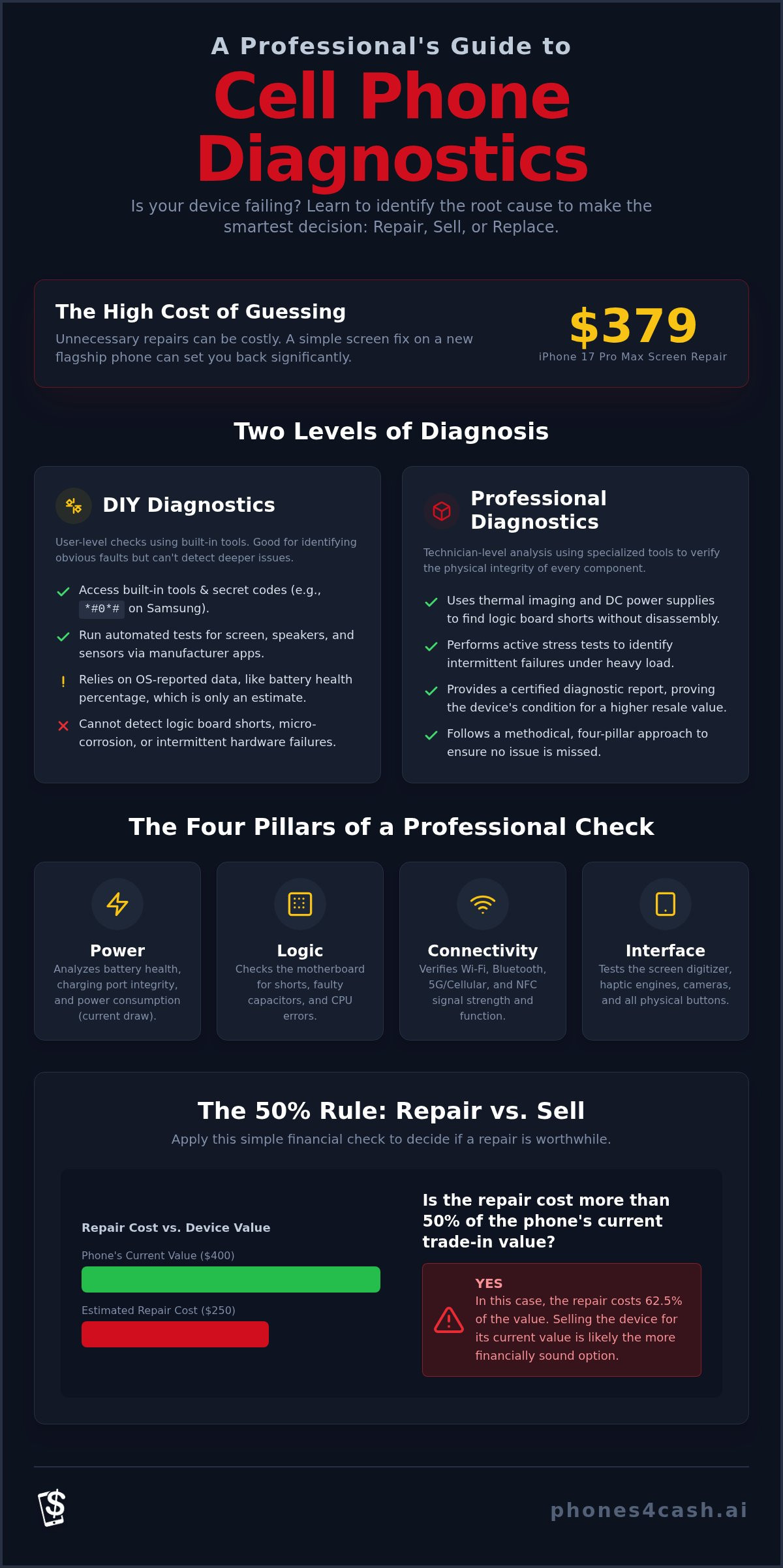
What if that sudden battery drain isn't a hardware failure, but a software conflict you can resolve in minutes? Most users fear they'll overpay for unnecessary repairs when a device begins to fail. You've likely felt the frustration of intermittent glitches or a phone that won't hold a charge. These issues make professional cell phone diagnostics essential before you commit to a service center. It's a common dilemma in 2026, particularly as screen repair costs for new flagships like the iPhone 17 Pro Max now reach $379.
This guide teaches you how to identify hardware and software issues using the same methods as expert technicians. By following these steps, you'll gain the clarity needed to decide whether it's smarter to repair, sell, or replace your hardware. We'll walk through systematic testing for internal components, software stability, and the impact of recent Right to Repair legislation. This ensures you have a data-driven path to restored functionality or the highest possible trade-in value.
Key Takeaways
- Distinguish between passive monitoring apps and active component stress tests to accurately identify the root cause of hardware failures.
- Learn how to access hidden manufacturer diagnostic menus on Android and iOS to verify battery health cycles and sensor functionality.
- Understand how professional cell phone diagnostics use thermal imaging and DC power supplies to pinpoint logic board shorts without unnecessary disassembly.
- Apply the "50% Rule" to determine if a repair is financially sound or if you should sell your device for its current trade-in value.
- See how a documented diagnostic report helps you secure the highest cash offer when selling a used smartphone in the Cincinnati area.
Understanding the Basics of Professional Cell Phone Diagnostics
Professional cell phone diagnostics represent a methodical verification of every hardware and software component within a device. Unlike consumer-level apps that simply report what the operating system sees, a professional check validates the physical integrity of the phone. This process is essential for maintaining the resale value of electronics in Cincinnati, Mason, and Fairfield. It ensures that a device isn't just working on the surface, but is structurally sound for long-term use.
There's a significant difference between passive monitoring and active testing. Passive monitoring involves background apps that track battery percentage or storage usage. In contrast, active testing involves stress tests that push the processor and sensors to their limits to identify intermittent failures. This level of mobile device testing ensures that components like the GPU or cellular modem don't fail under heavy load. These tests provide a level of certainty that a standard user-facing app cannot offer.
Technicians rely on the Four Pillars of a professional check to ensure nothing is missed during an evaluation:
- Power: Analyzing battery health, charging port integrity, and current draw.
- Logic: Checking the motherboard for shorts, leaking capacitors, or CPU errors.
- Connectivity: Verifying Wi-Fi, Bluetooth, 5G, and NFC signal strength.
- Interface: Testing the digitizer, haptic engines, and physical buttons for responsiveness.
This structured approach prevents technicians from chasing symptoms while ignoring the root cause. By isolating each pillar, they can determine if a problem is a standalone failure or a symptom of a larger motherboard issue.
Software vs. Hardware Diagnostics
Software diagnostics focus on error logs, kernel panics, and app-level conflicts. These are often the cause of glitches or slow performance. Hardware diagnostics look deeper at voltage drops, short circuits, and physical sensor degradation. While a factory reset might temporarily hide a software bug, it won't fix hardware fatigue. If a component is physically worn, the glitch will return once the system is under stress again.
When Should You Seek a Professional Diagnostic?
You should consider a professional assessment if your phone won't turn on or shows unusual power behavior. This includes no-draw scenarios where the phone takes no charge, or high-draw situations where the battery drains instantly. Overheating without high CPU usage is another red flag that suggests an internal short. Finally, running professional cell phone diagnostics is a critical step when preparing a device for the Phones4Cash buyback program. A certified report proves the device's condition, helping you secure the highest cash value for your trade-in.
How to Run DIY Diagnostics: Codes and Built-in Tools
You don't always need specialized equipment to begin troubleshooting your device. Manufacturers include built-in software tools designed to help users identify obvious hardware failures. While these tools provide a helpful starting point, they often lack the granularity found in professional cell phone diagnostics used by certified technicians. Most consumers rely on the "Battery Health" percentage found in settings, but this number is only an estimate. For a more accurate picture, you must look at the actual cycle count, which represents how many times the battery has been fully charged and discharged.
Using manufacturer-specific apps like Samsung Members or Apple Support can automate part of this process. These applications run a series of automated scripts to check the digitizer, microphone, and camera sensors. If an automated test fails, it's a clear indicator that a hardware replacement is necessary. However, software tools are restricted by what the operating system can access. They cannot detect micro-corrosion on the logic board or physical shorts in the charging circuit.
Android Secret Dialer Codes
Android devices, particularly those from Samsung, feature hidden menus accessible via the phone dialer. By entering *#0*#, you can access a hardware testing suite. This menu allows you to manually verify the functionality of the Red, Green, and Blue subpixels, the vibration motor, and the touch sensitivity of every quadrant on the screen. There are also universal codes like *#06# to display your IMEI number, which is vital for verifying warranty status. Be cautious when using these menus; changing internal settings without professional guidance can lead to software instability.
IOS System Logs and Analytics
Apple doesn't provide a visible hardware testing menu, but it does store detailed error logs. Navigate to Settings, then Privacy and Security, and select Analytics and Improvements. Inside the "Analytics Data" folder, look for entries labeled "Panic Full." If you see multiple logs with this name, it identifies a hardware crash, usually related to a failing sensor or a logic board issue. This data is invaluable because it records exactly what the phone was doing the moment it failed. If your DIY results are inconclusive, professional cell phone diagnostics can pinpoint the exact component causing the failure.
Access to these diagnostic features has been a point of contention for years. The FTC Report to Congress highlighted how anti-competitive repair restrictions often limit the tools available to consumers. Despite these hurdles, using built-in logs remains the best first step. If these steps reveal a significant hardware flaw, you may want to request a professional assessment before the issue worsens.
Advanced Professional Tools and Techniques
While built-in logs provide a starting point, professional cell phone diagnostics rely on physical measurements that software cannot capture. A primary tool in this process is the DC power supply. By connecting a device to a controlled power source, technicians can observe the exact milliamp (mA) draw when the power button is pressed. This allows them to identify a short circuit or a failed boot sequence before they even open the device casing. If the phone draws too much current instantly, it's a clear sign of a hardware short that no software reset can fix.
Thermal imaging cameras take this a step further by visualizing heat signatures on the logic board. When a component fails or shorts, it often generates excessive heat. These cameras allow a technician to see a "hot spot" on the motherboard, pinpointing a single failing capacitor among hundreds of microscopic parts. For power-related issues, technicians utilize specialized USB-C ammeters. These testers are essential for a broken charging port repair because they verify if the device is negotiating the correct power delivery protocols or if the port itself is physically compromised.
To ensure device integrity, professional software suites like PhoneCheck or 3uTools are used to verify part authenticity. These programs cross-reference the serial numbers of internal components with the factory "birth certificate" of the phone. This process confirms whether the screen, battery, or camera modules are genuine. Maintaining this level of transparency helps reduce the environmental impact of e-waste by ensuring devices are properly repaired and kept in circulation longer rather than being discarded due to faulty third-party parts.
Logic Board Microsurgery and Multimeters
Technicians use digital multimeters to measure resistance, voltage, and continuity across specific test points on the motherboard. This requires specialized microscopic equipment to navigate the dense circuitry of modern smartphones. A common focus is the Tristar or U2 IC, which controls charging functions in iPhones. If these chips fail, the phone may show a "fake charge" or fail to boot. Identifying these failures requires precise electrical probing that consumer tools simply cannot perform.
Stress Testing for Intermittent Issues
Intermittent glitches often require a "stress test" to surface. Technicians run intensive CPU and GPU benchmarks to force the device into thermal throttling. This reveals if the cooling system is failing or if the processor becomes unstable under load. RF testing is also conducted to monitor signal drops, particularly in known dead zones around Mason and Fairfield. Finally, every sensor in the array is verified, including accelerometers, gyroscopes, and FaceID modules, to ensure the professional cell phone diagnostics report is 100% accurate before any repair begins.
Interpreting Diagnostic Results: What the Data Tells You
When you receive a report from a professional shop in Cincinnati, you'll see a list of components and their functional status. Don't just look for green checkmarks. Instead, look for the specific data points that justify the technician's conclusion. For example, a report might show a high milliamp draw while the device is in a sleep state. This specific data distinguishes a simple dead battery from a leaking capacitor on the logic board. While a battery replacement is a routine fix, a leaking capacitor requires advanced microsurgery to resolve.
Liquid damage represents a unique challenge in the diagnostic process. Unlike a cracked screen with a visible break, liquid damage repair for smartphones involves diagnostics that are never 100% certain. Corrosion can be microscopic and progressive. This means a device might pass a test today but fail next week as oxidation spreads across the copper traces. A professional report will usually categorize liquid damage as "unstable" or "high risk" to ensure you understand the long-term reliability of the device.
Ghost touching is another symptom that requires careful interpretation. This occurs when the screen responds to touches that aren't actually happening. In most cases, this is a digitizer failure within the screen assembly. However, if professional cell phone diagnostics show the screen is functional but the touch IC (integrated circuit) on the board is failing, a new screen won't solve the problem. Identifying this distinction early prevents you from paying for a screen replacement that doesn't fix the root issue.
Common Error Codes and Their Meanings
Error codes help technicians identify specific manufacturer-defined failures. A software "brick" occurs when the operating system is corrupted but the hardware remains intact. This is usually fixable through a firmware restore. A hardware "dead" state means a critical component, like the CPU or NAND flash, has physically failed. A Boot Loop is a symptom of either software corruption or battery failure.
The Cost of Failure: Part vs. Labor
Diagnostics help you evaluate if a "Fail" mark is a minor expense or a major investment. A failing proximity sensor might be a $50 fix, but a damaged OLED panel on a flagship phone can easily exceed $300. Professional testing prevents "parts cannon" repair attempts, where technicians replace random components hoping one fixes the issue. If you're unsure about your device's health, visit a cell phone repair shop Cincinnati for an expert evaluation. Getting the right data first saves you from overpaying for unnecessary parts. You can book a diagnostic appointment online to get a clear breakdown of your repair options before committing to a fix.
The Verdict: Repair, Sell, or Buy Refurbished?
Deciding whether to invest in a repair or transition to a new device requires a logical framework. The "50% Rule" is a standard industry benchmark used to guide this choice. If the estimated repair cost exceeds half of the device's current market value, the investment is rarely sound. For instance, if an out-of-warranty screen replacement for an iPhone 17 costs $329 but the phone's resale value is only $600, you are nearing that threshold. Professional cell phone diagnostics provide the exact repair quote needed to make this calculation accurately.
Residents in Mason and Fairfield should use these results to weigh their options carefully. A certified diagnostic report eliminates the guesswork that often leads to sunk costs. If the logic board is failing, a simple screen swap won't extend the device's life. In these cases, choosing a certified refurbished device is a more reliable path to restored functionality. This approach also helps manage the environmental impact of your technology choices by keeping functional parts in the supply chain.
Maximizing Trade-in Value
A "Clean" diagnostic report significantly increases your buyback offer by removing the risk for the purchaser. Being transparent about minor issues, such as a slightly degraded battery, actually builds trust and can lead to a faster sale. In many cases, performing a quick iPhone battery replacement can boost the resale value enough to cover the cost of the service. When you are ready to upgrade, use your diagnostic data to sell used iPhone Cincinnati and secure the highest cash return.
Choosing Your Next Device
When the repair cycle becomes too frequent or expensive, it's time to stop spending on an aging device. Transitioning to a refurbished Samsung or iPhone offers a modern experience without the flagship price tag. Ensure your next purchase comes with a professional diagnostic certification to guarantee that all internal components have been verified. This documentation provides peace of mind that the device is free from latent hardware defects and has passed rigorous professional cell phone diagnostics before being sold.
Before visiting a tech center, follow this final checklist:
- Back up all personal data to a cloud service or external drive.
- Remove your iCloud or Google account to disable activation locks.
- Locate the original box and accessories to maximize trade-in value.
Visit Phones4Cash for a professional diagnostic and expert advice today to determine the most cost-effective path for your mobile investment.
Secure Your Mobile Investment with Expert Insights
Navigating a device failure doesn't have to be a guessing game. By moving beyond surface-level apps and utilizing professional cell phone diagnostics, you gain a clear understanding of your device's physical and digital health. You've learned how to identify logic board shorts, interpret complex system logs, and apply the 50% rule to protect your financial investment. Whether you're dealing with a sudden power drain or preparing for a trade-in, data remains your most valuable asset.
Technicians at Phones4Cash specialize in logic board diagnostics and serve residents across Cincinnati, Mason, and Fairfield. We provide transparent reports and no-obligation repair quotes so you can decide the next step for your hardware with total confidence. Don't let intermittent glitches or high repair costs create unnecessary stress. Get a professional diagnostic for your device at Phones4Cash Cincinnati and take the first step toward a functional phone or a high-value trade-in today. Reliable technology is within your reach.
Frequently Asked Questions
Is a professional cell phone diagnostic service worth it?
Yes, a professional assessment is worth the investment because it prevents you from paying for unnecessary part replacements. While a DIY check might suggest a new screen, a technician can identify if the actual issue is a failing touch IC on the logic board. This accuracy saves money and ensures the repair is permanent rather than a temporary fix for a deeper hardware symptom.
How long does a professional phone diagnostic take?
Most standard tests are completed within 30 to 60 minutes. However, complex issues like intermittent power failures or liquid damage require longer observation periods. Technicians need time to run stress tests and monitor voltage stability across the motherboard. If the device requires microscopic inspection of the logic board, the process might extend to a few hours to ensure every component is verified.
Can diagnostics detect water damage even if the phone works?
Yes, professional tools can identify liquid ingress even if the device currently powers on. Technicians check the Liquid Contact Indicators (LCI) and look for microscopic corrosion or mineral deposits on the motherboard. Identifying these early signs of oxidation is critical. It allows you to address the damage before the corrosion spreads and causes a total hardware failure or data loss.
What is the most common hardware failure found during diagnostics?
Battery degradation remains the most frequent hardware issue identified during testing. Beyond simple capacity loss, technicians often find failing charging circuits or blocked ports that mimic battery failure. In many cases, what seems like a dead phone is actually a logic board short or a compromised Tristar chip. Identifying these specific failures ensures you don't waste money on a battery that won't solve the problem.
Do I need to backup my data before a diagnostic test?
You should always back up your data to the cloud or an external drive before any hardware assessment. While professional cell phone diagnostics are non-invasive, testing internal components can occasionally trigger a security lockout or a system restore. Protecting your photos and contacts ensures that your information remains safe regardless of the hardware verdict or the subsequent repair process.
Can a diagnostic tell if my phone has been hacked?
A diagnostic check can identify unusual background processes, unauthorized root access, or suspicious battery drain caused by hidden applications. While it isn't a substitute for a dedicated cybersecurity audit, it reveals the physical and digital symptoms of compromised software. Technicians look for kernel panics and error logs that suggest the operating system's integrity has been breached by non-standard modifications or malware.
Why does my phone pass DIY tests but still act glitchy?
Built-in DIY tools typically perform passive checks that only report what the operating system can see. They often miss intermittent hardware failures that only appear under heavy CPU load or high temperatures. professional cell phone diagnostics use active stress testing and physical voltage measurements. These methods reveal micro-cracks in the logic board or failing capacitors that standard software menus simply cannot detect.
Is there a difference between iPhone and Android diagnostics?
Yes, the methods for accessing data differ significantly between the two platforms. Android devices often use secret dialer codes to access hardware testing suites, while iPhones rely on internal analytics logs and proprietary software. Despite these differences, the goal remains the same: verifying the structural and electrical integrity of the device. Technicians use specialized software suites that can communicate with both operating systems for a comprehensive health report.